

Choose the search tool that matches your clue
To search strings in Ghidra, first decide whether you are looking for data that Ghidra has already defined, text displayed anywhere in the program model, raw bytes in loaded memory, or an exact address. Defined Strings is a useful inventory, but it is not the same as a complete string search. A short string may not have been defined, a Unicode value may use a different encoding, and a value outside the current memory blocks may not be searchable from the same window.
A reliable investigation keeps the Listing as the address-level source of truth. Use the Decompiler to explain a function after you have located evidence, not as a replacement for the search itself. The official beginner documentation provides the wider CodeBrowser workflow; this page focuses on the search decisions that are easy to miss when you are new to Ghidra.
Only inspect software and systems you are authorized to analyze. A search result is evidence about a file, not permission to reverse engineer it or a guarantee that the file is safe to run.
- Known readable text: start with Defined Strings or Search for Strings, then inspect references.
- A label, symbol, function, or comment: use Search Program Text or the Symbol Tree.
- A precise address: use Go To, then confirm the loaded block and instruction at that address.
- A byte sequence or instruction pattern: use Search Memory or an instruction-aware search with the correct scope.
- A function that uses the result: follow XREFs and compare Listing, Function Graph, and Decompiler.
Search strings instead of guessing from the decompiler
If you know a visible message, URL, file path, command, or error fragment, search for the text before reading hundreds of functions. Open the Defined Strings view when you want an inventory of strings Ghidra has already recognized. If the value is missing, use the string-search action and review its encoding, minimum length, alignment, null-termination, and memory-block scope. A failed result often means the data definition or search scope is wrong, not that the text is absent.
Search results are useful only when you verify the address. Open the matching row in Listing, check the bytes and surrounding data, and confirm that the result is inside a loaded block rather than a display artifact. If Ghidra shows a string as undefined data, define it only after checking alignment and nearby references. Preserve the original project or work on a copy before applying large batches of data definitions.
- 1
Start with the readable clue
Keep the search term distinctive. A complete URL, error fragment, or unusual file extension usually produces fewer false positives than a common word such as error or init.
Defined Strings / Search for Strings - 2
Check encoding and scope
Try ASCII, UTF-8, UTF-16, or the encoding that matches the target. Confirm whether the search covers loaded blocks, all blocks, or only the current selection.
Encoding + memory block scope - 3
Open the address in Listing
Inspect the bytes, data type, nearby strings, and references. Do not treat a highlighted match as proof that the surrounding function is the one you want.
Open in Listing - 4
Follow the first useful reference
Use the references or XREF view to move from the data to a caller, comparison, formatter, or branch that gives the string meaning.
References / Show XRefs
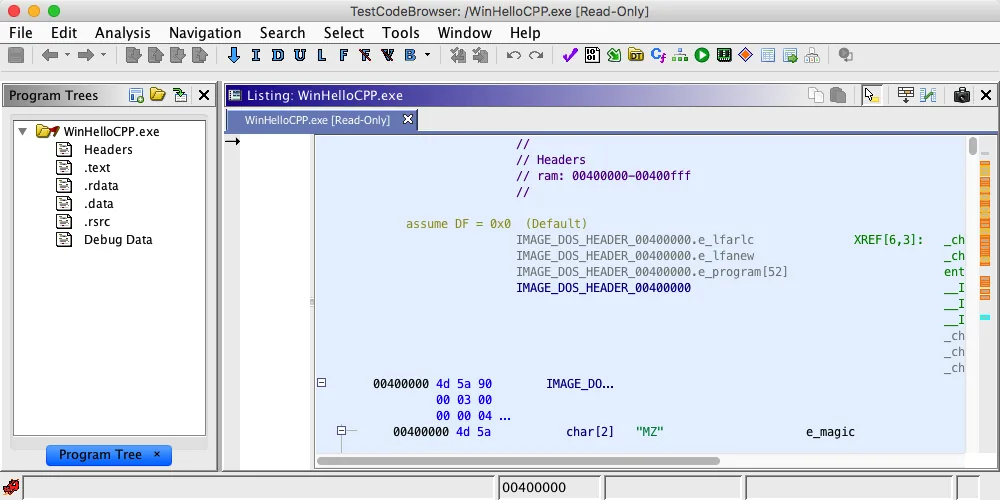
Find where a string is used and why it matters
Finding a URL or message is usually the midpoint, not the answer. Select the data item and inspect its references. A URL may be passed to a network routine, compared against a local value, or stored as an unused resource. A message may belong to an error path, a license check, a menu, or a debug-only branch. The reference address tells you where the program consumes the value; the caller and callee context tell you what role it plays.
When a reference lands in a complicated function, move between Listing and Decompiler instead of trusting one view. Listing shows the actual decoded instructions and addresses. Decompiler suggests a higher-level control flow and variable model. Rename only after the evidence supports the interpretation, then record what you observed separately from what you inferred. This keeps a useful search result from becoming an overconfident explanation.
- Confirm the reference is a real code or data reference, not only a nearby address match.
- Read the basic block around the reference and identify the comparison, call, or formatting operation.
- Check callers and callees before assigning a business meaning to a function name.
- Use Function Graph when branches are hard to follow in a linear Listing.
- Link to the Decompiler guide when the remaining problem is pseudocode interpretation.
Find a memory address, value, or byte pattern
A question such as “where is 0x00421A3F?” is a navigation problem first. Use Go To to jump to the address, then check the program, memory block, language, and address space shown by Listing. File offsets, virtual addresses, image bases, and rebased addresses are not interchangeable. If a copied address lands nowhere, verify whether it came from a file offset, a debugger trace, a log, or a relocated module.
For raw data, Search Memory is more appropriate than a text search. Search for the bytes in the correct order, account for endianness, and narrow the block or selection when the result set is large. A value can appear in code, data, padding, or an unrelated structure. Treat the search as a way to generate candidates; inspect the surrounding bytes and references before deciding which hit is meaningful.
A debugger, a file viewer, and Ghidra may report different coordinate systems. Preserve the source of the address and translate it deliberately instead of adding a constant until the screen looks plausible.
| Clue | Best first tool | What to verify next |
|---|---|---|
| Exact loaded address | Go To | Address space, block, instruction or data at the destination |
| Hex byte sequence | Search Memory | Endianness, alignment, block scope, nearby references |
| URL or readable message | String search | Encoding, definition, XREFs, consuming function |
| Name or label | Symbol Tree / Search Program Text | Namespace, symbol type, callers and callees |
| Value from a log or debugger | Go To plus Listing | Rebase, module base, trace address versus file offset |
Search for instructions and instruction patterns
Instruction searches require a more precise question than “find this word.” You may be looking for a mnemonic, a register use, a constant operand, an instruction sequence, or the bytes produced by a compiler. Search Program Text can help with visible instruction text and labels, while a memory or byte search is better when you know the encoding. The architecture and language selected during import determine how Ghidra decodes the same bytes, so confirm those settings before comparing results.
For Java instructions or other platform-specific terms, avoid mixing source-language vocabulary with disassembly syntax. Search the representation that actually appears in the Listing, then validate one hit by reading the operands and the surrounding control flow. If you need a repeatable pattern across many files, document the architecture, endianness, wildcard assumptions, and whether the search is over loaded memory or a selection.
- 1
Define the pattern
Write down the mnemonic, operands, bytes, registers, or constant that must be present. Mark which parts may vary between builds.
Pattern = mnemonic + operands + optional wildcards - 2
Choose text or bytes
Use text-oriented search when the decoded Listing form is stable. Use memory search when the byte encoding is the stable evidence and the architecture is known.
Search Program Text / Search Memory - 3
Validate a match
Open the result, inspect the full instruction and its basic block, then compare references and callers before treating it as a behavioral landmark.
Listing + XREF + Function Graph
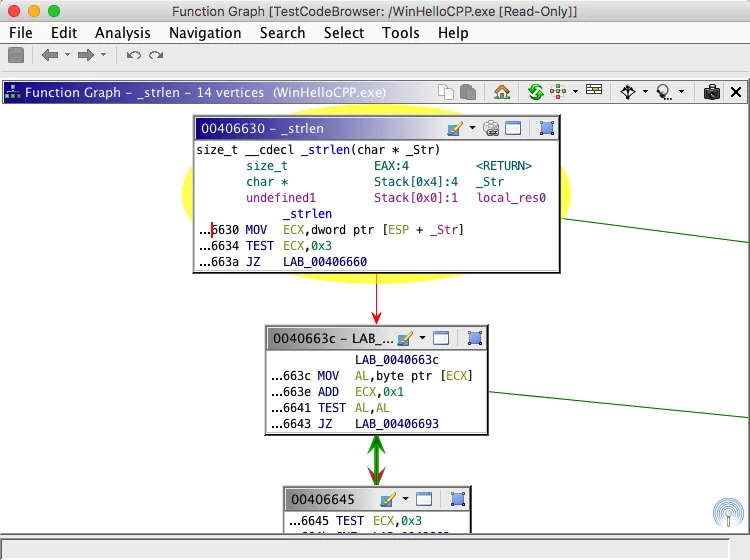
Find functions, undefined functions, and useful boundaries
Once a search result points into code, use the Symbol Tree, Function Window, or the current Listing context to determine whether Ghidra already recognized a function. “Undefined” can mean that analysis has not created the function yet, that the address is data, or that the imported architecture and boundaries need review. Do not create a function simply because a nearby sequence looks familiar; confirm a plausible entry point, references, prologue or calling convention evidence, and a return path where appropriate.
For a search-driven workflow, the function is a boundary for organizing evidence, not a conclusion about behavior. Record the address, the matched data or instruction, the reference that connects them, and the next function that consumes the value. This small evidence chain is easier to review than a renamed function with no explanation. The beginner tutorial covers the broader Auto Analysis and Function Graph workflow.
| Result | Interpretation | Safe next step |
|---|---|---|
| Named function | Ghidra has a symbol boundary | Inspect callers, callees, signature, and references |
| FUN_... or unnamed function | A function exists but its role is unknown | Use strings, calls, and data flow before renaming |
| Undefined address | No trusted function boundary yet | Check code/data classification and run focused analysis on a copy |
| Search hit in a block | The clue exists near code or data | Read the complete block and follow XREFs |
| No references | The value may be unused, indirect, or not defined correctly | Check encoding, pointer tables, relocation, and analysis scope |
Fix the most common no-result and too-many-result cases
The most common Ghidra search failure is a mismatch between the clue and the representation in the program. A URL may be split, encoded, compressed, stored as UTF-16, or constructed at runtime. An address may belong to a different module base. An instruction pattern may change because the compiler selected a different register or inserted a relocation. Change one variable at a time and keep the original clue next to the new search settings.
When the result set is huge, narrow the memory block, current selection, data type, minimum length, language, or address range. When there are no results, broaden one constraint, inspect adjacent bytes, try another encoding, and check whether the relevant memory has actually been loaded. If the problem is version-specific, compare the current release's official help rather than copying a menu path from an older screenshot.
| Symptom | Likely cause | Next check |
|---|---|---|
| No string result | Wrong encoding, short text, or undefined data | Try the matching encoding, lower the minimum length, inspect bytes |
| Too many text results | Common word or broad scope | Use a distinctive fragment and limit blocks or selection |
| Address cannot be opened | File offset, rebase, or wrong address space | Identify the coordinate system and loaded module base |
| String has no XREF | Indirect use, pointer table, or incomplete data definition | Inspect nearby pointers and run focused analysis on a copy |
| Instruction search misses matches | Different syntax, architecture, or compiler variation | Search bytes or a stable operand and verify language settings |
| Decompiler disagrees | Pseudocode is an interpretation | Return to Listing, bytes, references, and Function Graph |
Ghidra search questions
What is the easiest way to search strings in Ghidra?
Start with Defined Strings for an inventory, then use the string-search action when the value is missing or the encoding is uncertain. Open the result in Listing and follow its XREFs before interpreting the surrounding function.
How do I find a URL address in Ghidra?
Search for a distinctive part of the URL as a string, confirm its encoding and address in Listing, and then inspect references to find the function that reads, compares, formats, or sends it. A URL may be split or constructed at runtime, so no single string hit is guaranteed.
How do I search for a specific memory address in Ghidra?
Use Go To for an exact loaded address, then verify the address space, memory block, and decoded instruction or data. If the address came from a file offset or debugger trace, translate it first instead of assuming the coordinate systems match.
How can I search for specific instructions in Ghidra?
Use Search Program Text when the decoded Listing text is the stable clue, or Search Memory when the byte encoding is the stable clue. Confirm the imported architecture, endianness, operands, and wildcard assumptions, then validate each hit in Listing and Function Graph.
Why does a Ghidra string search return no results?
Check encoding, minimum length, alignment, memory-block scope, whether the data is loaded, and whether the string is split or constructed at runtime. Inspect nearby bytes and try one broadened constraint at a time.
Should I use the Decompiler to search for a string?
Usually search the string or bytes first, then use the Decompiler to understand the function that references the result. Decompiler output is a helpful interpretation, while Listing and the underlying bytes are the better evidence for the match itself.