
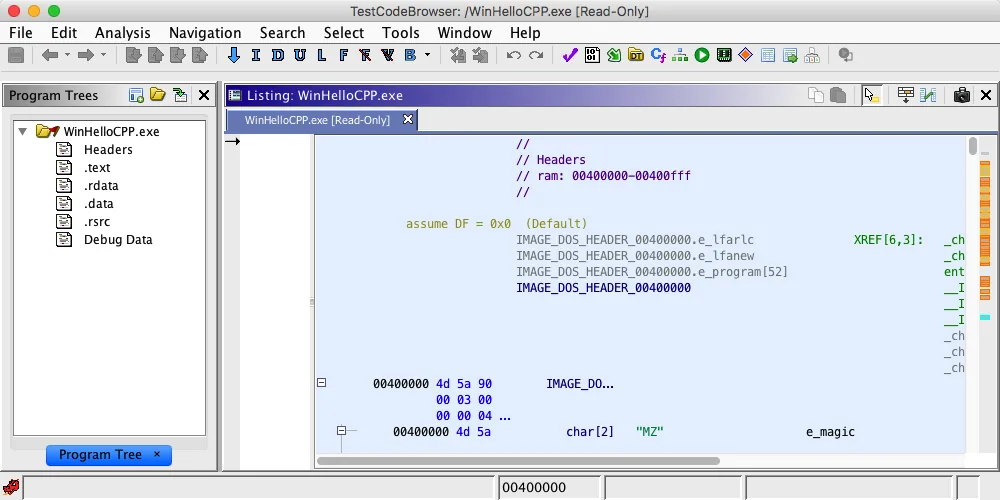
What you will learn in this Ghidra tutorial
Ghidra is a reverse-engineering platform for inspecting compiled programs. A useful beginner workflow is to create a project, import one file, confirm the detected architecture, run Auto Analysis, find an interesting function, compare assembly with decompiled C-like output, and record names and comments. This Ghidra reverse engineering workflow keeps each conclusion tied to visible evidence.
This guide focuses on static analysis. Use your own binaries, open-source samples, capture-the-flag files, or training programs you are allowed to inspect. It does not require executing the target file.
- Ghidra is a reverse-engineering platform for inspecting compiled programs. A useful beginner workflow is to create a project, import one file, confirm the detected architecture, run Auto Analysis, find an interesting function, compare assembly with decompiled C-like output, and record names and comments.
- This guide focuses on static analysis. Use your own binaries, open-source samples, capture-the-flag files, or training programs you are allowed to inspect. It does not require executing the target file.
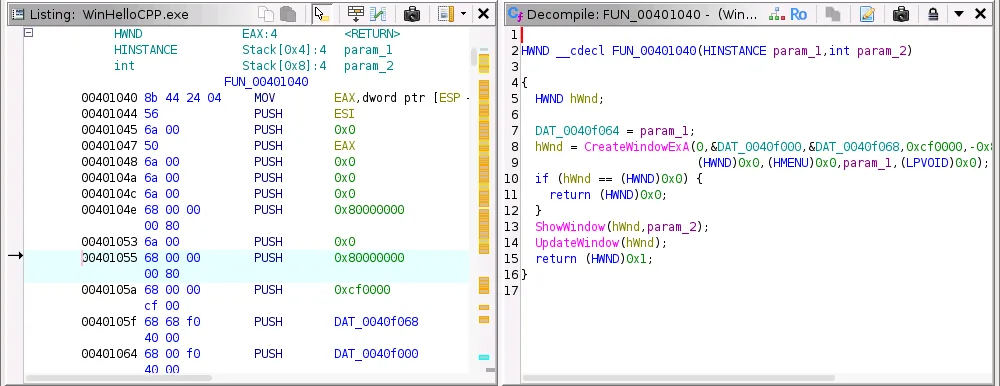
- CodeBrowser + Listing + Decompiler
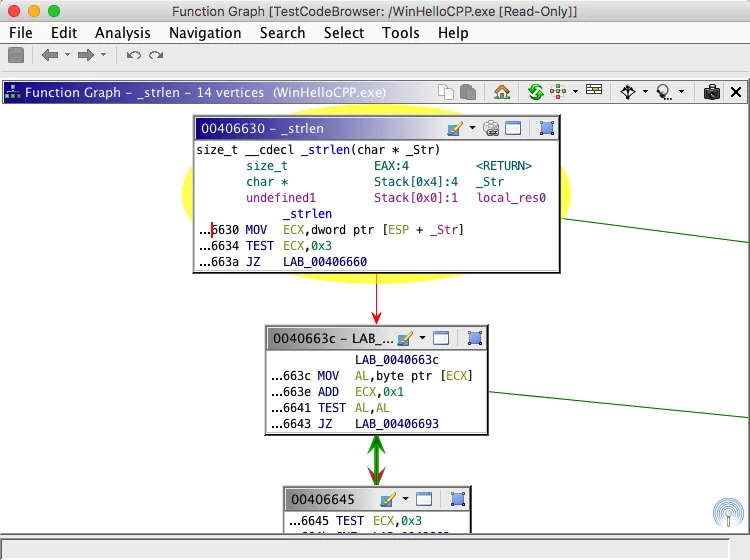
- XRefs + Function Graph
Set up a safe practice lab
Install Ghidra from the verified official release, use JDK 21, and keep unknown files away from personal documents and production credentials. A disposable virtual machine with snapshots is the safest default for untrusted samples.
For a first exercise, compile a tiny C program that checks a password string or choose a legal crackme created for learning. Calculate a hash before analysis and preserve the original file.
Install Ghidra from the verified official release, use JDK 21, and keep unknown files away from personal documents and production credentials. A disposable virtual machine with snapshots is the safest default for untrusted samples.
Create a project, import a file, and run Auto Analysis
Open Ghidra, choose File > New Project, select Non-Shared Project, and store it in a dedicated lab folder. Drag the executable into the Project window or use File > Import File.
Review the detected format, processor, language, endianness, and compiler specification. Common PE and ELF files usually work with the defaults, while raw firmware and uncommon architectures need manual confirmation.
- 1
Project
Open Ghidra, choose File > New Project, select Non-Shared Project, and store it in a dedicated lab folder. Drag the executable into the Project window or use File > Import File.
- 2
Import
Review the detected format, processor, language, endianness, and compiler specification. Common PE and ELF files usually work with the defaults, while raw firmware and uncommon architectures need manual confirmation.
- 3
Analyze
Open Ghidra, choose File > New Project, select Non-Shared Project, and store it in a dedicated lab folder. Drag the executable into the Project window or use File > Import File.
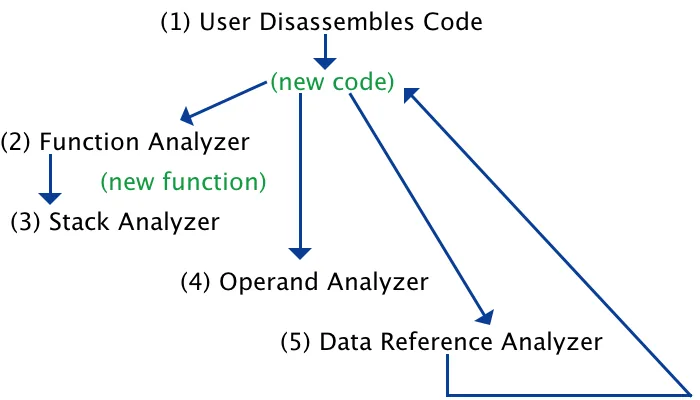
Read the CodeBrowser without getting lost
The Listing is the authoritative address-by-address view. The Decompiler provides a higher-level interpretation. Symbol Tree organizes functions and labels, while Defined Strings and Search help locate user-visible text.
Start from a recognizable string, inspect its references, and move into the calling function. This is usually faster than scrolling from the entry point through every instruction.
| Window | Purpose | Action |
|---|---|---|
| Listing | Instructions | Verify |
| Decompiler | Pseudocode | Interpret |
| Symbol Tree | Symbols | Navigate |
| Defined Strings | Text | Find anchors |
Use the Ghidra decompiler effectively
Select a function in the Listing to synchronize the Decompiler. Read parameters, local variables, conditions, loops, and calls, but confirm important conclusions against the Listing because decompiled output is an interpretation.
Improve the result as evidence appears: rename functions and variables, apply data types, define structures, and add comments. Each correction gives later analysis more context.
- 1
Find an anchor
Select a function in the Listing to synchronize the Decompiler. Read parameters, local variables, conditions, loops, and calls, but confirm important conclusions against the Listing because decompiled output is an interpretation.
- 2
Follow references
Improve the result as evidence appears: rename functions and variables, apply data types, define structures, and add comments. Each correction gives later analysis more context.
- 3
Confirm evidence
Select a function in the Listing to synchronize the Decompiler. Read parameters, local variables, conditions, loops, and calls, but confirm important conclusions against the Listing because decompiled output is an interpretation.
Follow cross-references and the function graph
Cross-references show where a symbol, address, string, or function is used. Inspect callers and callees to understand neighboring behavior.
Function Graph turns basic blocks and branches into a visual control-flow map. Use it for nested conditions and loops, then return to the Decompiler to explain each path. This Function Graph is also the practical CFG view beginners use to trace branches and loops.
A first 30-minute reverse-engineering exercise
Choose a small legal sample with one clear input and output. Import it, run analysis, locate success and failure strings, follow their references, identify the decision function, rename it, and explain the deciding condition in one sentence.
Add a bookmark to the key branch and save the project. The goal is not perfect source recovery; it is a repeatable evidence trail from string to reference, function, condition, and conclusion.
- 0-5
- 5-12
- 12-22
- 22-30
Common Ghidra beginner mistakes
Most early confusion comes from trusting the first decompilation too much, choosing the wrong processor language for raw data, judging results before analysis finishes, or renaming symbols without evidence.
Avoid enabling every analyzer, executing unknown binaries, or treating guessed types as facts. Re-import with the correct architecture when instructions and references look meaningless.
| Issue | Risk | Better choice |
|---|---|---|
| Pseudocode | Wrong inference | Check Listing |
| Architecture | Bad decoding | Re-import |
| Unknown file | Security risk | Isolated lab |
Where to go after this tutorial
Practice the same workflow on several small samples before adding scripts or debugger sessions. Then explore the official Ghidra documentation and the PyGhidra guide for repeatable automation. GhidraDocs.
The screenshots on this page come from the official National Security Agency Ghidra repository. The latest release verified on August 22, 2026 is Ghidra 12.1.3, published August 18, 2026. Continue with the focused Ghidra Decompiler guide or automate repeatable work with PyGhidra.
Ghidra tutorial FAQ
Is Ghidra safe to use?
Ghidra is open-source software published by the National Security Agency. Download it from the official GitHub release and analyze unknown files in an isolated lab without executing them.
Which languages can Ghidra decompile?
Quality depends on processor support, compiler patterns, symbols, and type information. Ghidra analyzes many native architectures but does not recreate exact original source.
Should a beginner use the debugger first?
Start with static analysis. Add the debugger after you can navigate functions, references, and control flow, and only run trusted or isolated samples.
Can Ghidra save a patched executable?
Ghidra can patch bytes and export some formats, but behavior depends on the loader and format. Preserve the original and verify exports separately.
How do I update Ghidra?
Download the newest verified official ZIP into a new folder instead of overwriting the old installation, then check project and extension compatibility.