
Ghidra vs IDA Pro: the short decision
Choose Ghidra when a zero license cost, inspectable source, a capable decompiler, and repeatable headless or scripted analysis are central to the work. It is a strong starting point for students, independent researchers, educators, and teams that need to distribute a reproducible lab without buying seats.
Choose IDA Pro when your team values a long-established interactive disassembler, commercial support, a familiar analyst workflow, or a specific Hex-Rays decompiler and processor module. The price can be justified when analyst time, existing training, and vendor support matter more than the initial software budget.
Neither product makes reverse engineering automatic. The better choice depends on the file formats, architectures, decompiler behavior, collaboration rules, scripting language, and evidence trail your project requires. Keep a small, authorized sample and test both workflows before moving a large case or a production triage process.
Compare the same binary, architecture, analyst question, and evidence standard in both tools. A fast-looking pseudocode panel is not a substitute for verifying the underlying instructions.
| Question | Ghidra | IDA Pro |
|---|---|---|
| Up-front cost | Free and open-source distribution | Commercial license with product and decompiler options |
| Primary experience | CodeBrowser, Listing, Decompiler, Function Graph | Interactive disassembler, graph views, and optional Hex-Rays decompiler |
| Automation | Java, Ghidra scripts, PyGhidra, analyzeHeadless | IDA Python, IDC, plugins, and batch interfaces |
| Best first test | Import a permitted sample and validate analysis settings | Open the same sample and compare navigation, typing, and decompilation |
Cost, licensing, and what a team is really buying
Ghidra removes the purchase decision from the first experiment. You can install the official distribution, inspect the project source, and give every authorized teammate the same version. That makes classroom labs, internal training, and disposable analysis environments easier to reproduce. You still own the work of documenting versions, extensions, Java requirements, and any local build changes.
IDA Pro is a commercial tool, so its total cost includes the license model that fits your organization, optional decompiler coverage, upgrades, and the training already present on the team. A paid license can be economical when an analyst already knows the interface, the team relies on vendor support, or a required processor module is available there first.
- Record the exact release, processor language, compiler specification, and extension versions used in the test.
- Estimate analyst minutes for import, navigation, type recovery, scripting, export, and peer review.
- Check whether a case needs a commercial support path, an auditable source tree, or a distributable classroom setup.
- Keep licenses, sample permissions, and exported findings inside the rules of your organization and jurisdiction.
Compare the day-to-day analysis workflow
Start the comparison with a question, not with a toolbar tour. Import the same permitted executable, confirm the architecture and image base, run the normal analysis pass, and locate one reliable anchor such as a string, import, export, or known entry point. Then measure how quickly each tool helps you move from that anchor to the function that answers the question.
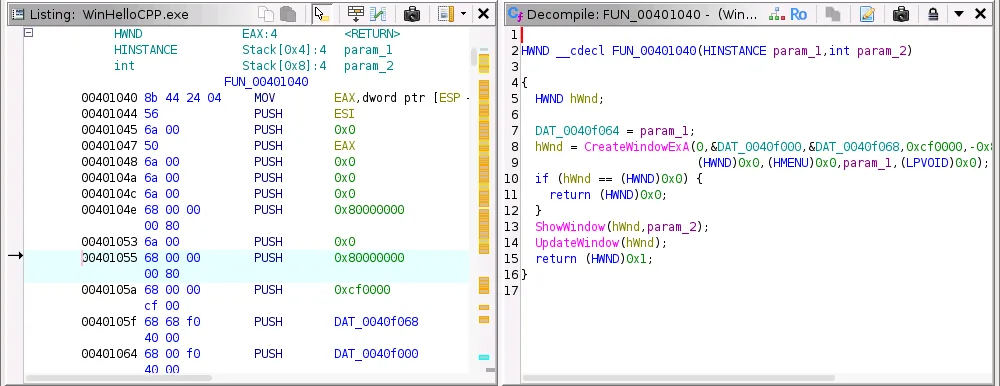
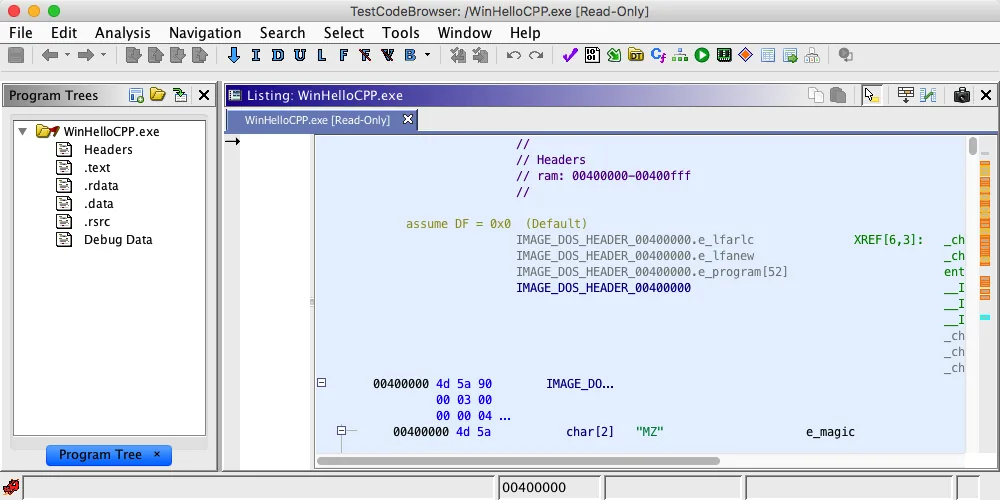
Ghidra's CodeBrowser keeps Listing, Symbol Tree, Decompiler, and related views in one project workspace. The arrangement is especially useful when you want to explain why a pseudocode statement maps to a group of instructions. Function Graph adds a visual control-flow check when early returns, loops, or shared blocks make the linear view hard to follow.
IDA Pro's interaction model is similarly centered on navigating an interactive disassembly and graph. Analysts often value the speed of renaming, commenting, cross-referencing, and moving between views. The relevant question is whether the layout and shortcuts reduce your team's review time for the cases you actually receive.
- 1
Use the same sample
Choose a small file you own or are authorized to inspect, and record its hash and architecture before opening either tool.
sample.bin - 2
Find one anchor
Search for a string, import, symbol, or known address. Avoid judging the tools by a random first screen.
Search -> For Strings - 3
Follow the evidence
Trace the reference to a function, inspect the graph, and note how many clicks or manual corrections are needed.
XRefs -> Function -> Graph - 4
Write the conclusion
Save the decisive address, condition, call, or data structure so a second analyst can reproduce the result.
address + evidence
Decompiler output, types, and analyst confidence
A decompiler is a reasoning aid, not a source-code time machine. Both Ghidra and IDA Pro can present C-like output, but compiler optimization, inlining, stripped symbols, indirect calls, exceptions, and obfuscation can make the output incomplete. The most valuable comparison is how clearly each tool lets you test a hypothesis against bytes, instructions, references, and callers.
In Ghidra, names such as param_1, local_18, FUN_00401230, and undefined8 are signals that the project lacks evidence. Renaming a stable symbol, correcting a function signature, or applying a structure can improve the view across callers. The change should be justified by data flow, repeated offsets, calling convention, or a known API rather than by how readable the first guess looks.
IDA Pro users may prefer the feel of its interactive disassembly and the behavior of a Hex-Rays decompiler for their supported architectures. That preference is valid, but the review discipline is the same: check branch direction, signedness, pointer depth, call arguments, and memory writes in the disassembly. Record uncertainty instead of turning a plausible line of pseudocode into an unsupported claim.
| Test | What to compare | Evidence to keep |
|---|---|---|
| Function boundary | Does the tool define the same entry and return paths? | Address range, callers, and graph edges |
| Data types | How quickly can you correct a prototype or structure? | Type change and affected callers |
| Indirect flow | Can you trace a table, callback, or computed target? | XRefs, targets, and assumptions |
| Review handoff | Can another analyst follow your edits? | Comments, labels, screenshots, and notes |
Scripting, headless analysis, and repeatable triage
Automation changes the comparison when you have dozens of files, a CI job, or a recurring question. Ghidra provides Java APIs, in-application scripts, PyGhidra for CPython workflows, and the analyzeHeadless launcher. Its project and script conventions reward teams that write down inputs, output locations, logs, and the exact analysis configuration.
IDA Pro provides IDA Python, IDC, plugins, and batch-oriented workflows that can be a natural fit for teams already invested in that ecosystem. The important test is not the language name. Measure whether the API exposes the facts you need, whether a script survives a new release, and whether a reviewer can reproduce the output without an undocumented desktop state.
- One file: use the GUI to understand the analysis and confirm the question.
- A small batch: add a script that records inputs, logs, addresses, and failures.
- A recurring pipeline: pin tool versions, isolate projects, and publish a reproducible report.
- A reviewable finding: keep the script, sample hash, tool version, and manual confirmation together.
When Ghidra or IDA Pro is the better fit
Ghidra is usually the pragmatic first choice when budget, transparent source, classroom distribution, or headless batch analysis matters. It is also a good fit when your organization wants to inspect or extend the framework and can invest in a shared workflow for Java, PyGhidra, or both. Expect to spend time learning its project conventions and validating decompiler assumptions.
IDA Pro may be the better fit when an analyst's speed with its interface has direct business value, when a required processor or decompiler path is already standardized, or when commercial support is part of the case process. Teams that have years of IDA scripts and saved databases should price the migration and retraining work before switching for a single feature.
| Scenario | Practical starting point | Reason |
|---|---|---|
| Learning reverse engineering | Ghidra | No seat purchase and strong teaching-oriented views |
| Existing IDA team | IDA Pro first | Lower interruption while scripts and habits are valuable |
| Open, repeatable batch | Ghidra headless | Accessible scripting and a distributable lab |
| Hard architecture case | Run a controlled side-by-side test | Coverage and decompiler behavior vary by processor and file |
Limitations, safety, and a fair evidence standard
Tool choice cannot remove legal or operational responsibility. Analyze software only when you have permission, use isolated samples, and keep secrets and personal data out of shared projects. Neither Ghidra nor IDA Pro certifies a file as safe, proves that a behavior is malicious, or grants permission to bypass a license or access control.
Performance and coverage vary with architecture, compiler, symbols, packing, anti-analysis behavior, and the quality of the initial import. A clean function in one tool is not proof that the other tool is wrong. Re-check the processor language, compiler specification, memory map, image base, function boundary, and analysis options before drawing a product verdict.
A comparison page can explain workflows and trade-offs. It cannot replace official release notes, a vulnerability assessment, legal advice, or a permission decision for a real target.
Ghidra vs IDA Pro FAQ
Is Ghidra better than IDA Pro?
Neither is universally better. Ghidra is compelling for free distribution, inspectable source, and repeatable scripting; IDA Pro can be the better fit for an established commercial workflow, specific processor coverage, or a team that values its interactive experience and support path.
Does Ghidra have a decompiler like IDA Pro?
Yes. Ghidra includes a C-like Decompiler. IDA Pro users may compare it with a Hex-Rays decompiler, but the useful test is how each output behaves on the same architecture and how easily you can verify it in the underlying disassembly.
Can I use Ghidra and IDA Pro on the same binary?
You can compare authorized copies of the same sample, provided your license, source, and handling rules permit it. Keep separate projects, record the input hash, and do not treat a database or script from one product as automatically portable to the other.
Which tool is better for beginners?
Ghidra is often an approachable first choice because it is freely available and has a complete project, Listing, Decompiler, and Function Graph workflow. A beginner who is joining an IDA-based team may learn faster by using the tool that the team already reviews and supports.
Should a report include pseudocode screenshots?
Screenshots can orient a reviewer, but keep the decisive address, bytes or instructions, assumptions, tool version, and manual verification in text. A screenshot alone is difficult to reproduce and can hide a misleading type or analysis setting.